Tone Detection JavaScript Quickstart
A rate-limited API developer key can be provisioned from the Sapling API dashboard. Developer keys allow for processing of 50,000 characters every 24 hours. Subscribe for production access and usage-based pricing.
Javascript SDK for Tone Detection
This page explains how Sapling's Javascript SDK provides a plug-and-play UI integration for Tone detection. Using tone detection SDK allows developers to easily add the ability to highlight the tone of content in any textarea / contenteditable, and flag any aggressive or negative tones.
1. Full-stack setup
The Tone detection integration builds upon our Fullstack Javascript Quickstart. Be sure to complete that guide before continuing.
2. Enable Tone
Open App.js and replace its contents with the following code
import './App.css';

import { useEffect } from 'react';
import { Sapling } from "@saplingai/sapling-js/observer";

function App() {
  useEffect(() => {
    Sapling.init({
      endpointHostname: 'http://127.0.0.1:5000',
      saplingPathPrefix: '/sapling',
      toneEnabled: true,
    });

    const editor = document.getElementById('editor');
    Sapling.observe(editor);
  });

  return (
    <div
      id="editor"
      sapling-ignore="true"
      contentEditable="true"
      style={{
        margin: '40px auto',
        padding: '10px',
        border: '2px solid black',
        width: '500px',
        height: '200px'
      }}>
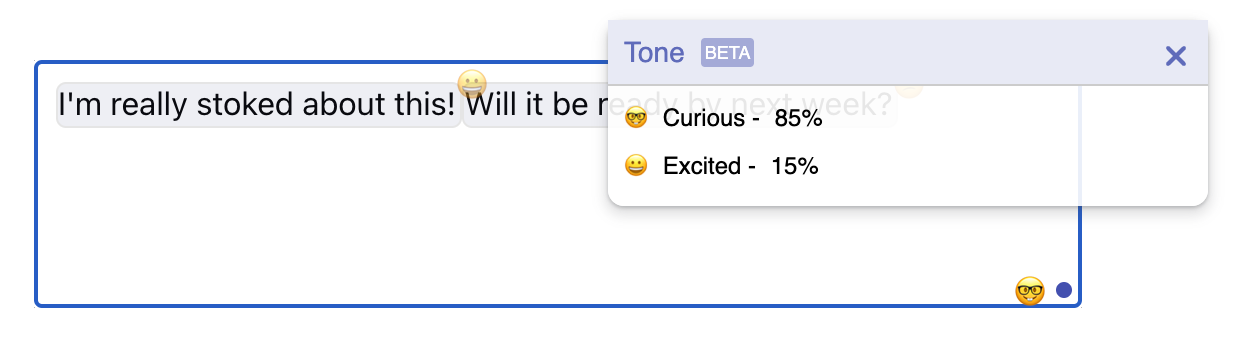
      I'm really stoked about this! Will it be ready by next week?
    </div>
  );
}

export default App;
3. Test it out!
That's it! Go to http://localhost:3000 and click the button! You'll see an overall score pop-up, and suspicious sentences higlighted in red.